UTF-16 text files generated by Windows
Today I learned a quick, curious lesson while doing some maintenance.
The ticket I received had Android logs (adb logcat). Usually I work with a bugreport zip file (adb bugreport) which contains other binaries and logs, but sometimes the tester only sends a compressed logcat file: that was the case.
As usual, after I extracted it I used my script to filter some Roadside Assistance logs (the issue is related to the emergency call feature, or eCall), but found none. In this scenario it usually means the emergency call was never used. Out of curiosity I checked the file with Vim and, to my surprise, saw several logs related to eCall.
In my quest to understand why my filters and scripts were not working, I discovered the files were encoded in UTF-16:
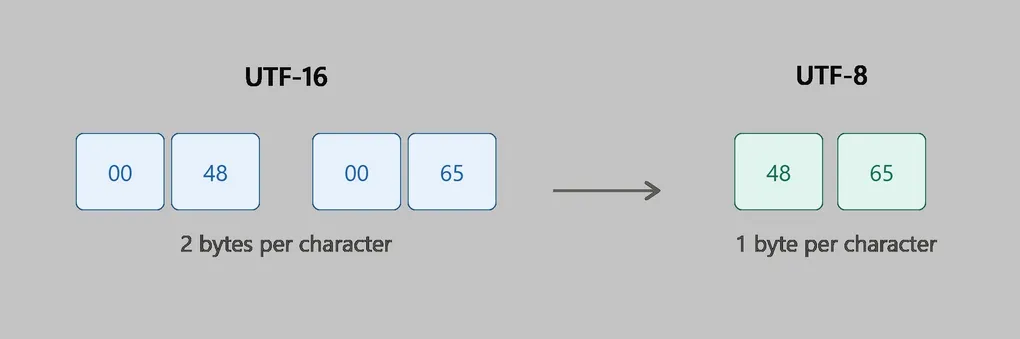
UTF-16 is a character encoding method that represents text using 16-bit code units (2 bytes each). It is designed to store characters from the Unicode standard.
Most common characters (such as English letters, many symbols, and common scripts) use one 16-bit unit. Less common characters (such as many emojis and historic scripts) use two 16-bit units (called a surrogate pair).
Example:
The letter A → UTF-16: 0041 (one 16-bit unit)
The emoji 😀 → UTF-16: two code units (D83D DE00)UTF-16 can be stored in either big-endian or little-endian byte order, depending on how the bytes are arranged.
It is widely used in systems like Java and Windows APIs because it provides a balance between memory efficiency and the ability to represent all Unicode characters. However, it is not always space-efficient for texts dominated by ASCII characters, where UTF-8 usually uses fewer bytes.
When I ran file on this file I got:
$ file oncall.txt
oncall.txt: Unicode text, UTF-16, little-endian text, with very long lines (707), with CRLF line terminators
It was a UTF-16 little-endian text file. grep (and my script) works with UTF-8/ASCII, so they could not find any keywords.
I fixed it by converting the file to UTF-8 with this command:
iconv -f UTF-16 -t UTF-8 oncall.txt > oncall_utf8.txtThe difference was clear: the UTF-8 file was about half the size of the UTF-16 file. After converting, my script was able to find the keywords and filter the logs.
When I asked the tester what he did, he told me he had just generated the file using this command on a Windows machine:
$ adb logcat >> log.txt